Meal Plannari
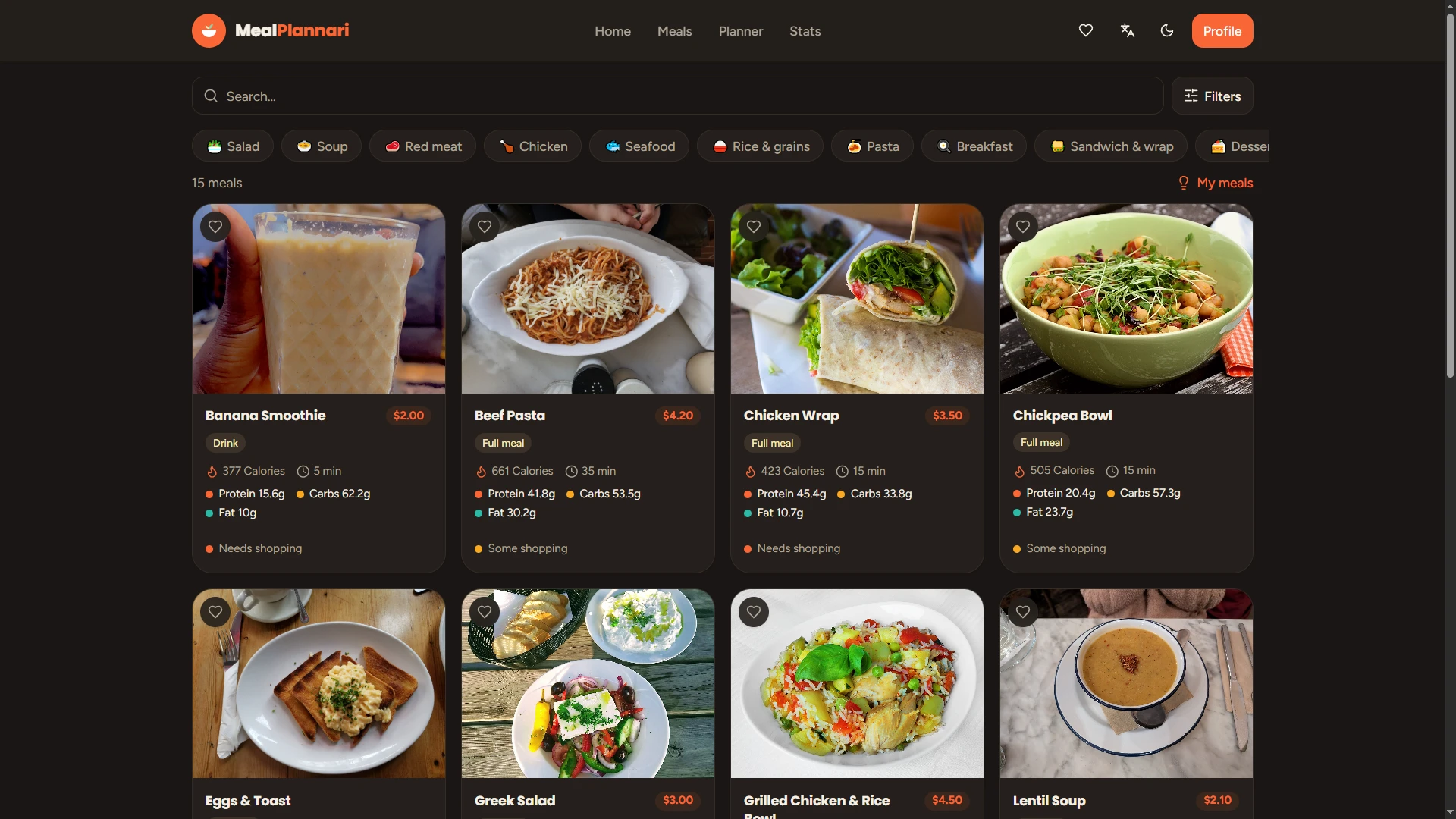
Paid calorie-tracking apps rarely let you build your own recipes, and there's no way to tell if tonight's plan needs a shopping trip or not. Meal Plannari fixes both: a week of meals with nutrition and price computed live from a shared ingredient database, your own recipes kept private or submitted to a moderated catalog, and a per-meal badge for whether it's pantry-ready or needs a store run.
-
01
Nutrition computed from ingredients — calories, macros, and price for every meal are derived live from a shared per-ingredient database, not entered by hand — change one ingredient and every meal using it updates.
-
02
Build & submit your own recipes — bilingual recipes with steps and ingredients, kept private or sent to an admin moderation queue to join the public catalog.
-
03
Pantry-ready shopping badge — a per-meal indicator based on what share of the recipe is pantry staples versus what you'd actually need to buy.
issues & fixes log
a running log of issues found and fixed during development.
| issue | solution | details |
|---|---|---|
| changelog.txt window showed a separate copy of this table that could silently drift out of sync with the actual document | changelog.txt now reads this table live from the Word document itself, instead of a duplicated copy | Parses word/document.xml directly (PHP's built-in ZipArchive + DOM, no extra package) via a view composer; cached by the file's own mtime, so an edit saved in Word appears on next page load with no manual cache-clear step |
| Resume was hidden behind clicks — closed by default, easy to miss entirely | Added a Windows-style toast notification prompting visitors to download it | Slides in ~7s after load, dismissible ("later"/"x"), download button opens the locale-correct CV; dismissal remembered for the session so it doesn’t re-nag on reload |
| No mobile-friendly layout — the desktop window metaphor didn’t work on phones | Built a separate responsive mobile layout | Bottom tab bar (about / projects / resume / contact), single-column panels, auto-switches under 768px width; not a shrunk desktop, a distinct layout |
| Windows shrank awkwardly at narrower browser widths, becoming cramped and hard to read | Windows now keep their full, fixed size always; they overlap instead of shrinking | Widths no longer scale with viewport (%/vw removed); content that doesn’t fit is reached by scrolling within the window or dragging it into view |
| Desktop showed an unexpected vertical scrollbar | Removed the artificial minimum height; each window’s height is now capped relative to its own position | A window starting further down the page gets proportionally less height budget, so its bottom edge is always clear of the taskbar |
| Scrolling the mouse wheel unexpectedly scrolled the page sideways | Removed canvas scrolling entirely; windows are repositioned by dragging instead | Chrome redirects vertical wheel input into horizontal scroll when only horizontal overflow exists — removing the scroll capability removes the glitch, and matches how a real desktop works (drag, don’t scroll) |
| Taskbar buttons for open windows could silently disappear at narrow widths | Made that row scroll horizontally instead of clipping | Buttons are never lost — just reachable by scrolling the taskbar row — with a thin scrollbar so it’s not invisible |
| Windows and popups could be dragged (or positioned by default) off-screen | Added a small safety margin (12px) on the left, right, and top edges | Applies both to a window’s default position and to dragging; a window simply can’t go further in that direction rather than hanging off the edge |
| Low-contrast numbers (white text) on light pastel card backgrounds | Changed numeral color to dark ink | Was ~2:1 contrast (near-invisible on pink/blue cards), now ~12:1, meeting accessibility standards; fixes both the About page cards and the new Projects feature cards |
| Opening a direct project link didn’t bring the projects window to the front | The projects window now auto-focuses whenever a project route is visited | Applies whether navigating from the homepage, the project list, or a direct project link |
| "Take a break?" popup appeared instantly on page load, before any real activity — contradicting its own "you’ve been scrolling" text | Delayed the popup to only appear after 50 seconds of genuine inactivity | Mouse movement, scrolling, clicks, or typing all reset the 50-second timer — it only shows once the page has actually gone still |
| Closing a window briefly looked like it "sank" behind other windows before disappearing | Fixed a timing bug in the closing animation | Window now fades out smoothly in place instead of dropping behind its siblings first |
| Navigating between project pages reset all window positions and open/closed states — closed windows reopened themselves | Window state (open/closed, position, focus) now persists across navigation for the session | Every project page is a full page reload; window state is saved to session storage and restored each time, so it feels like one continuous desktop rather than resetting on every click |
| Language choice was stored in a server session, so the site needed a live PHP server just to remember which language you picked — ruling out free static hosting | Moved the language into the URL itself (/en, /fr, /ar), so each language is its own independent set of pages | The switcher now links to the same page in the other language instead of hitting a session endpoint. Laravel injects the current locale into every generated link automatically, so no internal link had to be rewritten by hand — and each language exports as its own real HTML files that work with no server at all |
| The contact form posted to a PHP backend that saved to a database — neither of which exists on a static host, so the form would silently break once deployed | Switched the form to Netlify's built-in form handling, with validation moved into the browser | A hidden copy of the form in each page is what registers it with Netlify at deploy time; the desktop window and the mobile panel both submit to it. Field-level validation and error messages now run client-side in all three languages, and a honeypot field catches spam bots |
| The first static export baked into every link, asset, and image path — the site would have loaded nothing at all on the real domain | Added a build step that strips the origin, leaving root-relative paths | Laravel always generates absolute URLs from a configured base address. Rewriting them to root-relative means the same build works on the live domain, on the temporary Netlify address, and on the per-commit preview builds — without the export needing to know where it will be hosted |
I'm a software engineer with a Master's in Software Engineering, and before I write any code I like to actually understand the problem — what's really needed, how the pieces fit together — then build it out in short Agile cycles instead of one big reveal at the end. Day to day that means Laravel and React on the web, Flutter on mobile, and AI tools like Claude Code wherever they genuinely speed up development.
-
01
Requirements & systems analysis — turning stakeholder needs into a structured system design before writing code.
-
02
Agile development cycle experience — sprint planning, iteration, and demos, not just feature delivery.
-
03
Academic-level rigor — a Master's in Software Engineering, plus hands-on teaching experience in algorithms and software testing.
-
04
End-to-end ownership — from requirements gathering to deployment, across web and mobile.
✓ make site
□ ship it
□ drink water